Hail tracking apps like HailRecon help contractors find storm-hit areas, check for possible damage, and organize post-storm prospecting. Instead of relying on scattered weather reports or driving around hoping to spot damage, your team can use storm data to decide where to spend its time. Drone hail software can also help speed up insurance claims.
This matters because storm work is time-sensitive. When a storm moves through your area, other contractors are likely looking at the same neighborhoods. Getting your team organized early gives you a better shot at reaching homeowners, booking inspections, and earning their trust before they’ve talked to several other roofers. A good hail app can help you win insurance jobs and also:
- Find affected neighborhoods: Use hail maps and storm reports to narrow down areas worth checking.
- Check storm history: Look back at past weather events when a homeowner asks whether their property had hail.
- Organize canvassing: Track which properties your reps have visited and which homes still need follow-up.
- Find potential prospects: Use available property and contact info to support targeted outreach.
- Coordinate your team: Give sales managers and field reps a shared view of storm activity and prospecting progress.

5 Best Hail Apps for Roofers
Roofers often use hail apps to get a read on where hail fell without climbing onto slippery, wet roofs first. A mapped hail swath doesn’t confirm damage on any one roof, so you still need to inspect. Here are five hail apps worth comparing. Check each company’s site for current features and pricing, since both can change.
1. HailRecon: Great for Mobile Hail Mapping and Canvassing
Great for: Roofing companies whose sales reps need to follow storm paths, check properties, and track door-to-door activity from the field.
HailRecon is the mobile app for Interactive Hail Maps. It gives roofing contractors hail maps on iPhone, iPad, and Android, so reps can check storm activity without carrying printed maps or going back to the office to use a desktop dashboard.
One of its most useful features is the location indicator. Your rep can see where they are in relation to a hail swath while driving through an unfamiliar neighborhood. The app also supports map markers and turn-by-turn directions, which makes it easier to get back to a specific spot or check an area you found during storm research.
HailRecon also has a built-in canvassing feature that tracks which doors your reps have knocked. That helps you keep track of neighborhood coverage and spot houses that still need follow-up, which gets especially useful when several salespeople are working the same storm.
Other features include:
- Radar-based hail swaths with different hail-size classes.
- Hail Finder for locating past storms in a selected map area.
- On-the-ground hail reports from storm spotters.
- Address-specific hail history and Hail Impact Reports.
- Live alerts during a hail event.
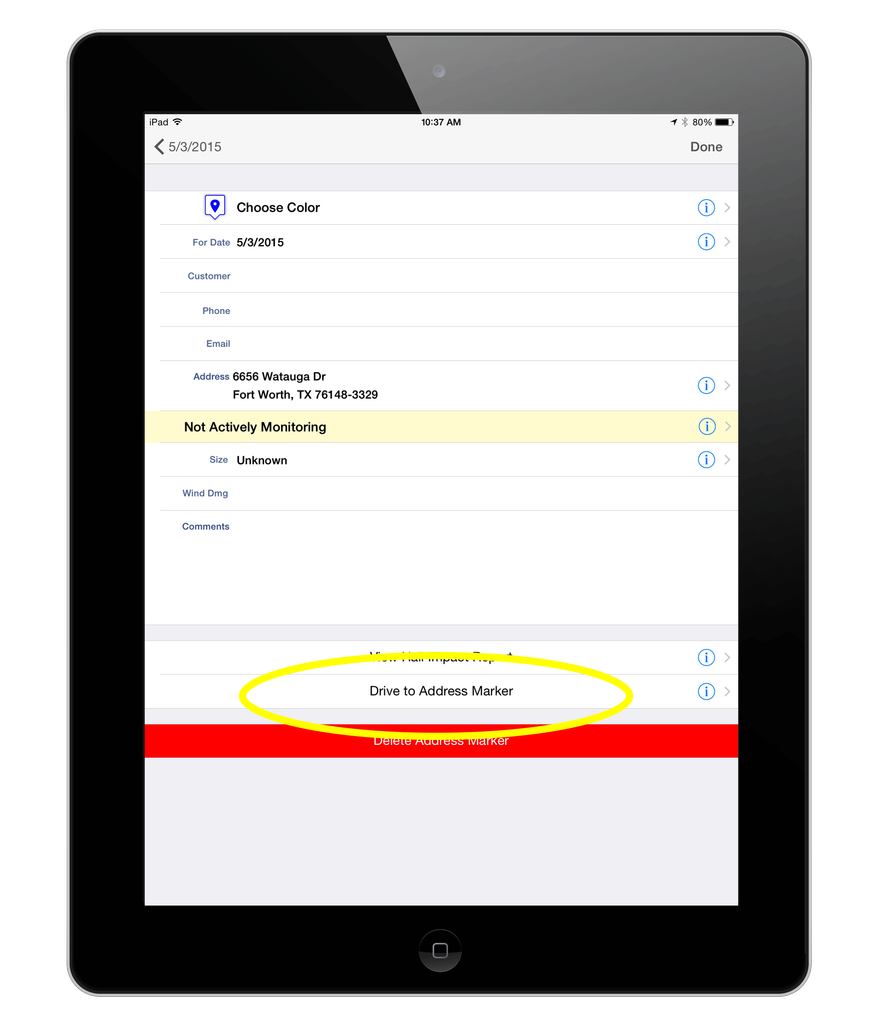
Interactive Hail Maps sells subscriptions by coverage area, and prices depend on the plan you choose. Check the official pricing page for current plans before you subscribe.
What to consider: HailRecon is a strong fit when your team needs to work straight from a mobile map. But a canvassing record isn’t the same as a full sales pipeline. You still need a reliable process for assigning leads, documenting homeowner conversations, scheduling inspections, and following up after the first visit.
2. HailTrace: Great for Storm Intelligence and Lead Prospecting
Great for: Roofing companies that want storm maps, property info, weather reports, and prospecting tools on a broader platform.
HailTrace combines storm mapping with weather data and property-level prospecting. Its maps show hail size and intensity, the most affected areas, and estimated affected structures, along with NOAA storm reports.
You can also generate weather history reports for locations hit by a storm. HailTrace says its maps include property and contact details, which can help contractors look into potential opportunities.
HailTrace sells different plan levels, so features can vary by subscription. That makes it important to compare what’s included in the plan you’re considering, instead of assuming every prospecting tool comes with basic map access.
What to consider: HailTrace offers more than a basic hail map, but what your team gets depends on your plan. If you need property data, commercial prospecting, or canvassing tools, confirm which plan includes them. Also check how the platform fits into your CRM and sales process. You can also compare HailTrace with HailRecon.
3. HailWatch: Great for Storm Alerts and Direct Marketing
Great for: Contractors who want storm data along with marketing support for reaching affected neighborhoods.
HailWATCH is a storm-data service from AnythingWeather. Its offerings include daily and real-time hail alerts, high-resolution hail maps, HailFACTS reports, a storm archive, and turn-key direct marketing solutions.
That mix can be useful if you want to connect storm identification with a neighborhood outreach campaign. For example, your marketing team can use storm data to decide which areas deserve attention, then plan a direct-mail campaign while your sales reps get ready to check those neighborhoods.
What to consider: HailWatch is more than a mobile canvassing app. Before you choose it, be clear about which mapping, reporting, and marketing services you actually need. If your main need is tracking individual door knocks and managing rep activity in real time, compare it with a dedicated field-sales tool.
4. Hail GPS: Great for Field Crews That Need Hail and Street-Level Information
Great for: Roofing and restoration teams that want address-level hail info and a way to pick streets to work.
Hail GPS focuses on helping crews see where hail fell and which areas may be worth checking. Its site says you can read the hail size at an exact address, see hail history for an address going back to 2021, and pick the streets worth working. It also says new swaths show up on your map within minutes of a storm.
For a contractor, the practical benefit is simple: your reps need more than a weather alert. They need to know where to go, record what happened at each property, and track the next step.
What to consider: Check device support, account setup, and the exact features your team gets before you roll it out. Also look at how any lead tracking works with the CRM you already use. You don’t want reps typing the same homeowner info into several systems.
5. HailPing: Great for Evaluating Storm Opportunities
Great for: Contractors who want storm reports that help them decide which neighborhoods and prospects to check.
HailPing is another option for roofing and restoration teams. It brings together radar-estimated hail swaths, ground reports, and storm info to help contractors decide whether an event deserves attention.
Its site describes ranked neighborhood recommendations, business info near storm paths, address and business lookups, and tools for saving prospects and tracking follow-ups. It also offers push and email alerts when hail is reported in your selected states. HailPing says these are business-planning alerts, not weather warnings, and that full lead lists, exports, and radius alerts are Pro features.
That approach can help a contractor go beyond just seeing that hail fell somewhere in the service area. The more useful question is whether the event gives your team a real chance to book inspections and serve homeowners.
What to consider: Look closely at how the platform decides which storms and neighborhoods deserve attention. Treat its recommendations as a starting point for prospecting, not a guarantee that every listed property has roof damage or that every contact will become a customer.
How to Choose the Right Hail App for Your Roofing Business
The best hail app is the one that solves a real bottleneck in your storm response. A company with two sales reps in one local market has different needs from a restoration business running several teams across multiple states. Before you pay for a subscription, ask these questions:
1. Does it cover your service area?
Check whether the platform gives you the storm history, alerts, and coverage you need. A nationwide map may sound great, but don’t pay for coverage in places your team will never work.
2. Can your reps use it in the field?
A tool can look impressive on a desktop and be frustrating when a salesperson is standing outside a house. Test the mobile experience, map navigation, marker placement, and canvassing workflow before you commit.
3. Does it give you the info you actually need?
Some contractors mostly need storm alerts and hail swaths. Others need historical reports, property info, contact data, or commercial prospecting. Figure out your needs before you compare plans.
4. Can you track what happens after a rep finds a prospect?
This is where many roofing companies lose steam. Your hail app may point you to a promising neighborhood, but your team still has to record conversations, schedule inspections, send estimates, and follow up.
5. Does the subscription make financial sense?
Compare the cost against how often your company works storm events and how much time the software saves. A feature-packed platform isn’t a good deal if your team only uses a small part of it.
How to Turn Hail App Data Into Roofing Leads

Buying a hail app won’t fill your pipeline on its own. The payoff comes from what your team does with the info. Build a repeatable process before the next storm hits.
- Set up your service areas and alerts. Set notifications for the markets you actually serve. Decide which storms deserve immediate attention, so your team isn’t distracted by activity outside your territory.
- Review the storm before sending reps out. Check the hail swath, storm history, ground reports, and affected neighborhoods. Use that to decide which areas to check first, instead of treating every mapped property as a confirmed roofing lead.
- Assign territories and responsibilities. Decide which reps will work each neighborhood. Make sure everyone knows where to go and how to log a visit. That keeps two salespeople from knocking the same doors while other streets get skipped.
- Talk to homeowners with useful info. Explain that a storm passed through the area and offer to inspect the roof. Don’t tell homeowners they have damage before you’ve looked at the property. An honest, professional conversation builds more trust than a high-pressure pitch.
- Track every conversation and follow-up. Record whether the homeowner answered, asked for an inspection, said no, or needs another conversation. Set reminders so interested homeowners don’t drop out of your pipeline after the first visit.
- Review the results. Compare the neighborhoods your team worked with the inspections booked, estimates sent, and jobs sold. Over time, this shows you which storms and outreach methods produce real opportunities in your market.
Turn More Storm Opportunities Into Signed Roofing Jobs
Want a CRM that helps your team sell more jobs without losing track of the people behind them? Try ProLine, the communication-first CRM built for roofing contractors who want to serve homeowners better, protect their margins, and make it home for dinner.
FAQs
What’s the best hail app for roofers?
The right app depends on your workflow. HailRecon is worth a look for mobile hail mapping and canvassing, while HailTrace offers broader storm data and property prospecting features. HailWatch, Hail GPS, and HailPing are other options to compare based on your team’s needs.
What does HailRecon do?
HailRecon is the mobile app for Interactive Hail Maps. It helps roofing contractors view hail swaths, see their location in relation to storm paths, look up hail history, generate hail impact reports, and track canvassing activity.
Are hail tracking apps accurate?
Hail tracking apps use radar data, storm reports, and other weather info to help find areas hit by hail. But a mapped hail swath doesn’t confirm that an individual roof has damage. Contractors should inspect the property before drawing any conclusions about its condition.
Can hail apps help roofing companies generate leads?
Yes. Hail apps can help contractors find storm-hit neighborhoods, check properties, and organize targeted outreach. But the app doesn’t replace prospecting, homeowner conversations, inspections, or follow-up. Those are what decide whether an opportunity becomes a signed job.
Do roofing contractors need both a hail app and a CRM?
They do different jobs. A hail app helps you find storm activity and possible prospecting areas. A CRM helps you manage homeowner communication, appointments, estimates, and follow-ups. Using both can give your team a more organized process from storm to signed job.