
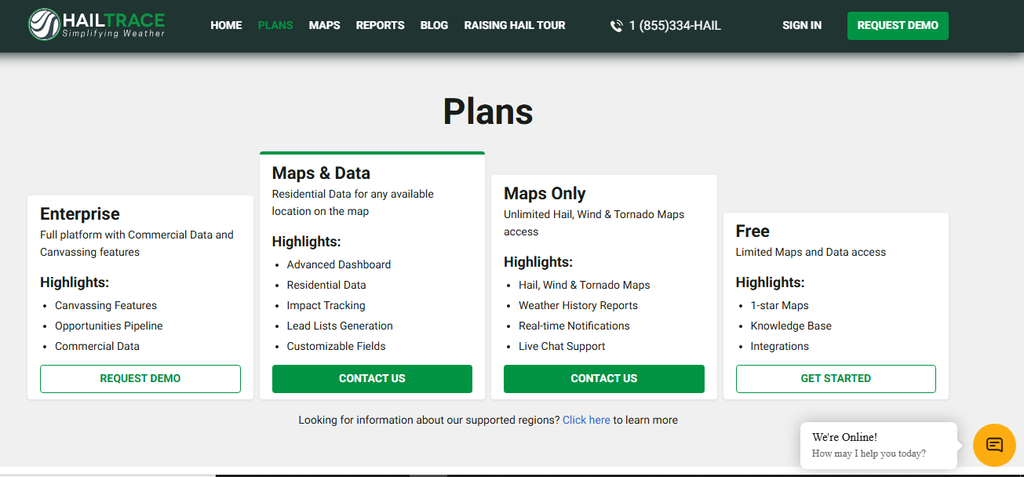
Want to know about HailTrace pricing? HailTrace doesn’t publicly list fixed monthly or annual prices for its paid plans. Its official plans page points interested contractors to contact the company or request a demo. That means you should be careful with third-party articles that quote a specific HailTrace price. Unless the number comes from a current quote for your needs, it may not match what your company will actually pay. HailTrace offers several access levels:
- Free: Limited access to maps and data, including 1-star maps.
- Maps Only: Hail, wind, and tornado maps, weather history reports, real-time notifications, and live chat support.
- Maps & Data: Adds residential property data, an advanced dashboard, impact tracking, lead list generation, and customizable fields.
- Enterprise: The full platform, with commercial data and canvassing features.
HailTrace’s terms of service say it provides services on an annual, quarterly, or monthly subscription basis, as bundled packages, and a la carte. So the important question isn’t just which plan costs less. It’s which one gives your team the tools it needs without paying for features that sit unused.
If you’re comparing hail apps, it helps to see how they stack up side by side. Our HailTrace vs. HailRecon comparison is a good place to start.

What Do You Get With Each HailTrace Plan?
The plans serve different kinds of roofing operations. A contractor who mostly needs to monitor storms has different needs from a restoration company running several canvassing crews and chasing commercial work. Here’s how to think about each option.
1. HailTrace Free: For Basic Storm Monitoring
The free option gives you limited access to HailTrace’s maps and data, including 1-star maps. It also includes the knowledge base and integrations. It can be a reasonable starting point if you’re new to the platform and want to try its basic mapping before you commit to a paid plan.
But limited map access isn’t the same as having the full set of tools to run a storm restoration operation. If your team depends on detailed weather history, residential prospecting, lead lists, or canvassing management, you’ll need to look at the paid options.
Great for: Contractors who want to try HailTrace before deciding whether a paid plan fits their workflow.
2. HailTrace Maps Only: For Storm Tracking
The Maps Only plan focuses on weather data. It gives you unlimited hail, wind, and tornado maps, along with weather history reports and real-time notifications.
This is a practical starting point if your company already has a separate system for managing prospects and sales activity. You can use HailTrace to spot storm activity and research affected areas without buying its extra prospecting tools. For example, if your sales manager uses another CRM to assign leads and track follow-ups, Maps Only may cover the storm-monitoring side.
But don’t overlook the difference between spotting a storm and finding individual properties to pursue. If your team spends a lot of time building prospect lists by hand, the next plan may be worth more to you.
Great for: Roofing companies that mainly need storm maps, weather history, and notifications.
3. HailTrace Maps & Data: For Property Prospecting
Maps & Data adds residential data for any available location on the map, plus tools that help you turn storm info into possible sales opportunities. Its listed features include:
- Advanced dashboard
- Residential data
- Impact tracking
- Lead list generation
- Customizable fields
This plan matters more when your team wants to go beyond spotting storm paths and start building targeted prospect lists.
Instead of sending reps into a broad area based only on a hail map, you can use property data to narrow your prospecting. That can help your team organize its work and spend less time deciding which neighborhoods to hit.
Picture a company that serves several communities across one metro area. After a storm, the sales manager needs to find the affected neighborhoods, make prospect lists, and split up the opportunities among reps. Residential data and impact tracking can support that process.
Great for: Contractors who actively chase residential storm leads and want property data tied to their mapping.
4. HailTrace Enterprise: For Larger Restoration Operations
Enterprise is HailTrace’s full platform, adding commercial data and canvassing features. Its listed highlights include:
- Canvassing features
- Opportunities pipeline
- Commercial data
This is the option worth a look if your company has several sales reps, runs larger restoration campaigns, or works on both residential and commercial properties.
The advantage is having more of the storm-to-sales workflow in one platform. Your team can spot storm activity, organize opportunities, assign canvassing areas, and track activity instead of juggling disconnected tools.
That doesn’t mean every growing roofing company needs Enterprise. If you have two sales reps and a fairly small service area, the extra features may not be worth the cost. Weigh the features against your actual workload.
Great for: Established storm restoration companies that need residential and commercial prospecting, canvassing coordination, and opportunity tracking.
What Makes HailTrace Worth Considering?

HailTrace is more than a map viewer. Its value comes from connecting weather info with the work roofing contractors do after a storm. Here are some features worth checking during your evaluation.
Meteorologist-Created Storm Maps
HailTrace says its team of meteorologists tracks hail, wind, hurricanes, and tornadoes to produce storm maps. For a roofing contractor, the practical benefit is weather data that helps you find areas worth a closer look.
A map can help you decide where to start, but it isn’t proof that every property inside a storm swath has roof damage. Your inspection still has to establish the real condition of each roof.
Real-Time Storm Notifications
When a storm hits a market where you already have customers or prospects, timely info can help your team respond.
HailTrace offers real-time notifications, and with the 5.0 update, you can create assets that notify you when a property is hit by future hail, wind, or tornado activity. The idea is simple: instead of waiting for a customer to call after a storm, you can spot relevant weather and see which existing relationships may need attention.
That gives you a chance to share useful info and offer an inspection where it makes sense. It also gives your company a reason to stay in touch with customers between roofing projects.
Residential and Commercial Property Data
Property data can help you turn a storm map into a more focused prospecting plan. Residential data supports neighborhood-level lead generation, while Enterprise adds commercial data. That matters if your company works on warehouses, retail centers, schools, churches, or other commercial properties as well as homes. HailTrace’s 5.0 release also added a way to search for businesses impacted inside a storm area, such as churches, schools, and restaurants, which makes commercial prospecting a bigger part of its newer workflow.
HailTrace 5.0 and Field Productivity
HailTrace announced version 5.0 on May 22, 2026. According to the company’s release, the update includes:
- A toolkit that brings weather events, reports, assets, lead lists, and map settings into one starting point.
- Quick actions on the map for requesting a weather report, creating an asset, or requesting a lead list for a drawn area.
- Light and dark map modes, plus left- or right-hand layouts and toggleable map layers.
- A Statute of Limitations Date Picker for finding storms close to a one-year or two-year claim deadline.
- A search for businesses impacted inside a storm area.

These features are worth exploring during a demo, especially if your sales reps spend most of their day canvassing instead of working from a desk.
The Statute of Limitations Date Picker deserves a closer look. It can help you find older storms that may matter to property owners approaching a claim deadline. But a tool’s date range doesn’t prove a particular claim is still valid. Policy terms and your state’s rules still matter.
Questions to Ask Before Buying a HailTrace Subscription
Because HailTrace uses quote-based pricing, your demo should do more than show you the interface. Use the conversation to understand exactly what you’re buying. Ask these questions:
- What’s the total monthly or annual cost for the features and coverage area we need?
- Are there separate fees for extra users, property data, reports, or canvassing tools?
- What happens if we want to add another market or grow our service area?
- Does the subscription include historical storm data, and how far back does it go?
- Which features are included in the plan, and which are add-ons?
- Are there minimum subscription terms or automatic renewals?
- What happens if we cancel or decide not to renew?
- Is onboarding or team training included?
- Which CRM and canvassing integrations work with it today?
- Can we see the mobile workflow our reps will use?

Choose the Hail App That Supports Your Sales Process
HailTrace offers more than storm maps, but the right plan depends on how your roofing company works. If you need basic weather data, Maps Only may be enough. If you want property data and lead generation, look at Maps & Data. And if you run bigger residential and commercial canvassing campaigns, Enterprise deserves a closer look.
Request a demo, get the full quote in writing, and compare the cost against the work your team can realistically generate. Then connect those storm opportunities to a consistent sales process with ProLine, the Communication-First CRM that helps roofing contractors sell more jobs, build stronger homeowner relationships, and make it home for dinner.
FAQs
Does HailTrace offer a free plan?
Yes. HailTrace offers a free option with limited maps and data, including 1-star maps. It also includes the knowledge base and integrations. The free option doesn’t include the full capabilities of the paid plans.
Does HailTrace publish its subscription prices?
No. HailTrace doesn’t publish prices for its paid plans on its plans page. You need to contact the company or request a demo to get a quote based on your needs.
What’s the difference between HailTrace Maps Only and Maps & Data?
Maps Only focuses on hail, wind, and tornado maps, weather history reports, and real-time notifications. Maps & Data adds residential data, an advanced dashboard, impact tracking, lead list generation, and customizable fields.
Is HailTrace worth it for a small roofing company?
It depends on how often your company chases storm restoration work and which features you need. A small contractor that regularly canvasses storm-hit neighborhoods may get value from a paid plan. A company that only needs occasional storm info may do better starting with the free option or buying individual maps.